
Choosing the best smart AC controller with WiFi means deciding between simple remote replacement and advanced climate monitoring. The main differences lie in whether you need basic app control, complex automation, or sensors for air quality. These devices turn your existing AC into a smart home system, helping you manage comfort while you’re away.
Best overall: Sensibo Sky Controller, which offers a wide range of smart features and deep compatibility with almost any remote-controlled AC system, making it the most reliable choice for most homes. Best for first-time buyers: Breez Lite Controller, which provides a straightforward setup and essential smart features. Best for hard-working systems: Breez Max Controller, which stands out for its multi-zone support and AI-based climate management, perfect for those who need to coordinate several units in one space.
The rest of this guide is for homeowners looking to modernize their cooling setup without replacing their current hardware.
How We Picked
We compared 48 different smart AC controller listings to identify the most reliable options on the market. Our selection focused on products that clearly state their compatibility with infrared remote systems and offer verified smart features like geofencing and scheduling. We excluded models that lacked essential technical specifications or failed to provide clear information on app support and voice integration. Every pick included here offers a specific set of features backed by the manufacturer’s own product data.
All 10 products side by side — scroll sideways to see every column.
| Best Choice | ||||||||||
| Preview |  |  | 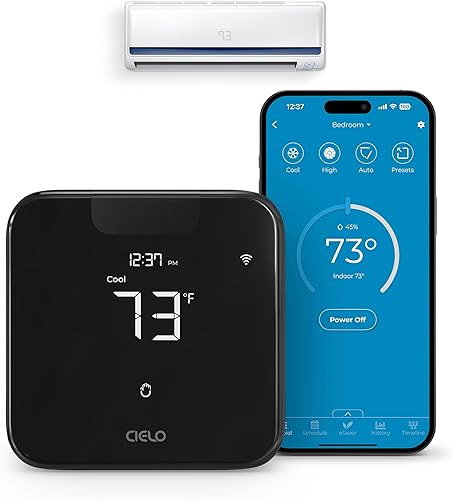 |  |  | 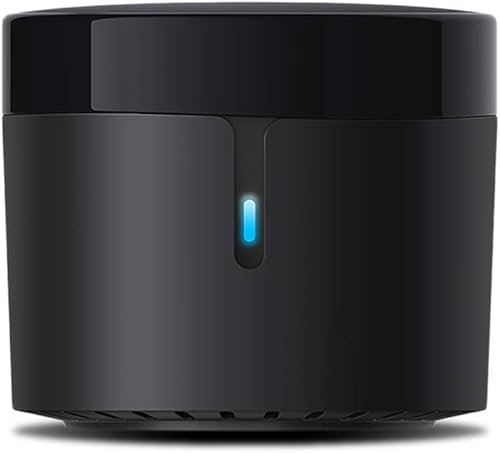 |  |  |  |  |
|---|---|---|---|---|---|---|---|---|---|---|
| Product | Sensibo Sky Controller | Sensibo Air PRO | Breez Max Controller | SwitchBot Hub Mini | MrCool HVAC Controller | BroadLink RM4 Mini | WOOX AC Controller | Breez Eco Controller | Breez Lite Controller | WiFi Smart IR C1 |
| Brand | Sensibo | Sensibo | Cielo Breez | SwitchBot | MRCOOL COMFORT MADE SIMPLE | Broadlink | WOOX | Cielo Breez | Cielo Breez | Sanofuturion |
| Best for | Best Overall | Best Air Quality Monitoring | Best for Mini-Splits | Most Versatile IR Blaster | Best for Ductless Systems | Most Compact Design | Simplest Setup | Best Eco-Friendly Features | Best Entry-Level Option | Best Multi-Function Controller |
| The listing says | Makes remote-controlled AC units smart Connects via WiFi for app control | Built-in air quality sensor Monitors indoor air quality levels | Connects to 2.4 GHz Wi-Fi network Compatible with IR remote units | Easy app setup with smart learning Controls infrared appliances via app | DIY installation WiFi enabled | Supports 50,000+ IR controlled devices Includes preloaded remote templates | Smart controller for IR AC units Built-in temperature and humidity sensor | Works with IR remote AC units Precise temperature and humidity sensing | Controls AC units from anywhere Compatible with 20,000+ AC models | Adjusts IR devices based on climate LCD screen with Type-C power |
| More information | Check Price on Amazon | Check Price on Amazon | Check Price on Amazon | Check Price on Amazon | Check Price on Amazon | Check Price on Amazon | Check Price on Amazon | Check Price on Amazon | Check Price on Amazon | Check Price on Amazon |
1. Sensibo Sky Controller
Best for: Most standard home cooling setups.
The Sensibo Sky Controller acts as a bridge between your phone and your existing air conditioner. It uses a small, 3.2” x 2.2” x 0.8” wall-mounted unit to send infrared signals that mimic your original remote. This allows you to control temperature and humidity from anywhere, provided you have a WiFi connection.
The device works with window units, mini-splits, ductless systems, and portable ACs. If your unit relies on a remote control, the Sensibo Sky can manage it. However, it doesn’t support Bluetooth, so ensure your unit is compatible with infrared signals before purchase.
Its geofencing feature is a standout, as it detects when you’re leaving or arriving to adjust your home’s climate automatically. You can also use Climate React to scan both temperature and humidity, using a dual setpoint to maintain a precise “real feel” environment.
Pros
- Simple wall-mounted design
- Wide device compatibility
- Includes helpful geofencing
Cons
- Doesn’t support Bluetooth
- Requires line-of-sight to the AC unit
If you’re setting up multiple rooms, create unique 7-day schedules for each zone. This ensures you never pay to cool an empty house, while the voice control integration with Alexa, Google, and Siri keeps adjustments hands-free.
2. Sensibo Air PRO Smart Controller & Air Quality Sensor
Best for: Families concerned about indoor air quality.
The Sensibo Air PRO goes beyond simple temperature control by adding a built-in air quality sensor. It tracks CO2 and TVOC levels continuously, which helps you monitor the health of your home environment. This is especially useful in offices or living areas where air stagnation is a concern.
By combining temperature and humidity monitoring with air quality data, this unit helps maintain a “real feel” climate. If you want to keep your room safe and comfortable, this is a top choice.
If your primary goal is energy efficiency, use the Climate React feature. It scans indoor and outdoor conditions to prevent hot and cold fluctuations, which can reduce energy consumption by up to 40%. When you leave the house, geofencing ensures the unit powers down automatically.
Avoid placing the device near direct heat sources or in enclosed cabinets. Doing so will skew the sensor readings, causing the system to miscalculate the “real feel” temperature. For the most accurate data, keep the unit on an open, flat surface.
Pros
- Tracks CO2 and TVOC
- Includes humidity sensor
- Connects via Bluetooth
Cons
- Larger footprint than basic models
- Requires consistent power
3. Breez Max Controller
Best for: Managing multiple mini-split units.
The Breez Max Controller is built for users with complex setups, particularly those with multiple mini-split units. It features an AI-based system called Comfy Max that learns your habits to prevent overcooling or overheating. This ensures your home stays at the right temperature without constant manual adjustments.
One of its most useful features is the ability to synchronize multiple units to avoid mode conflicts. If you have several AC units in different rooms, you can manage them all through one app. Pair one controller with each indoor unit to force all devices into the same mode or shut them down to prevent system errors.
For reliable performance, place the device within 6-12 feet of your air conditioner. It must remain in the direct line of sight to send IR signals effectively. If the touch buttons stop responding, simply press the temperature up and down buttons simultaneously to unlock them.
Pros
- Excellent multi-zone control
- AI-based energy savings
- Includes calibration features
Cons
- Requires line-of-sight
- Slightly more complex setup
4. SwitchBot Hub Mini Smart Remote
Best for: Users who want a central smart home hub.
The SwitchBot Hub Mini acts as an IR blaster for TVs and air conditioners, consolidating your various remote controls into one app. It functions as the gateway for the broader SwitchBot ecosystem, enabling cloud services and internet connectivity for your devices.
Use the “smart learning” mode to mimic an existing remote in just five seconds. Because the unit is USB-powered and portable, you can relocate it to ensure a clear line of sight between the hub and your infrared appliances. If you place the hub behind metal objects or thick construction materials, the connection will likely drop. Always prioritize a direct, unobstructed path to the device you intend to control.
Check your network settings before installation. The hub only supports 2.4GHz Wi-Fi networks. If your home uses a dual-band router, manually force your phone and the hub onto the 2.4GHz frequency; the device will fail to connect if it attempts to join a 5GHz signal.
Pros
- Works with many devices
- Small and portable
- Easy setup process
Cons
- Lacks climate sensors
- No 5GHz WiFi support
5. MrCool Smart HVAC Controller Enhanced WiFi Kit
Best for: Dedicated ductless split system owners.
The MrCool HVAC Controller is specifically designed for ductless split systems. It offers a simple DIY installation process that lets you bring WiFi connectivity to your existing unit. It’s compatible with standard smart home voice assistants, allowing for hands-free temperature adjustments.
If you own a ductless system, this controller is your primary path to remote management. You should choose this kit if your goal is basic, reliable connectivity without the complexity of a full-home automation overhaul.
This controller is a straightforward solution for those who already use MrCool hardware or similar ductless systems. It lacks the extensive sensor arrays found in more advanced units. If you require granular room-by-room data, this unit will not satisfy your needs.
Pros
- Built for ductless systems
- Simple DIY installation
- Voice assistant compatible
Cons
- Limited advanced features
- Minimalist design
6. BroadLink RM4 Mini IR Universal Remote Control
Best for: Minimalist setups with tight space.
The BroadLink RM4 Mini is one of the most compact IR blasters available. Its small size allows it to blend into any room without drawing attention. Despite its footprint, it supports over 50,000 infrared devices, making it a highly compatible option for TVs, fans, and AC units.
The device relies on a cloud-based library that updates regularly to include newer models. If your specific appliance isn’t in the database, you can use the manual learning function to copy your remote’s signals.
Before you buy, confirm your appliance uses infrared signals rather than Bluetooth, Zigbee, or RF. If your remote works only when pointed directly at the device, it’s likely IR. If it works through walls or cabinets, it’s RF or Bluetooth, and the RM4 Mini won’t work.
Because the unit requires a clear line-of-sight to function, place it on an open shelf or table. Avoid hiding it behind furniture or inside closed cabinets, as this will block the infrared signal. If you have multiple devices in different rooms, you’ll need a separate unit for each space.
Pros
- Extremely compact size
- Massive device database
- Manual learning function
Cons
- Requires clear line-of-sight
- No built-in climate sensors
7. WOOX Smart Air Conditioner & Heater Pump Controller
Best for: Users who want a Swiss-made sensor.
The WOOX AC Controller includes a Swiss-made thermohygrometer sensor that provides high-precision readings within ±0.3°C. This allows for accurate automation, as the controller triggers your AC based on real-time room data rather than guesswork.
Setup is straightforward, with an auto-detection feature that identifies your AC brand and model. If your specific remote isn’t recognized, the IR learning function copies 99% of remotes to your app. Use this for TVs, projectors, or motorized curtains, not just air conditioners.
The app allows for 7-day programming and geofencing, ensuring your home is cooled right when you need it. If you use central HVAC systems, look elsewhere, as this device is strictly for Mini Split, Window, and Portable units.
Pros
- Highly accurate sensor
- Easy auto-detection setup
- Supports geofencing
Cons
- Requires 2.4GHz WiFi
- Not for central HVAC systems
8. Breez Eco Controller
Best for: Eco-conscious climate management.
The Breez Eco Controller focuses on energy savings and healthy home environments. It provides detailed usage statistics so you can track how much your AC is running. This data helps you identify habits that might be driving up your energy bills.
The device includes precise temperature and humidity sensing, which is essential for ensuring your AC operates efficiently. It also features a local power button, which is a rare and useful addition if your WiFi connection ever drops. If you want insights into your cooling habits, this is a strong pick.
For the most reliable signal, place the unit within 6 to 12 feet of your air conditioner. It must remain in the direct line of sight to function correctly. If your remote isn’t detected automatically, contact the support team between 9 am and 9 pm EST, Monday through Friday.
Pros
- Detailed usage history
- Local control button
- Includes table stand
Cons
- Requires specific placement
- Setup requires WiFi
- Limited to units with IR remotes
9. Breez Lite Controller
Best for: Smart home entry.
It offers essential smart features like scheduling, geofencing, and voice control. It is perfect for users who want to make their AC smart without any extra fluff.
The unit is small and non-intrusive, fitting into any room decor. It supports IFTTT and SmartThings, which allows for deeper integration if you already have a smart home setup. To ensure the device functions correctly, place it within 6–12 feet of your unit. It must remain in the line of sight to send signals effectively.
If you have a large home, add multiple controllers to create distinct HVAC zones. This allows for efficient cooling or heating throughout your entire living space.
Pros
- No monthly subscriptions
- Compact, sleek design
- Wide integration support
Cons
- Requires line-of-sight placement
- Limited to 6–12 feet from the unit
- Basic sensor set compared to premium models
10. WiFi Smart IR Remote Control C1
Best for: Users who want an on-device screen.
The WiFi Smart IR C1 stands out because it includes a clear LCD screen. This display shows you the current temperature, humidity, and time at a glance. The LCD screen allows you to see the room’s temperature, humidity, time, and date without opening an app.
The controller is powered via a Type-C USB cable, which ensures constant operation. It also allows for smart automation, where the device triggers your AC or humidifier based on the current room conditions.
Pros
- Built-in LCD screen
- Universal Type-C power
- Real-time environmental monitoring
Cons
- Requires constant power
- Larger than basic blasters
How to Choose in Sixty Seconds
Which difference actually matters?
The most important difference is whether you need sensors. If you just want to turn your AC on before you arrive, a basic IR blaster like the SwitchBot Hub Mini is enough. However, if you want your AC to turn on automatically when the room gets too hot or humid, you need a controller with built-in sensors, such as the Sensibo Air PRO or WOOX AC Controller.
Sensors allow the device to “see” the room’s environment, which is the key to true automation. If you prioritize health, look for units like the Sensibo Air PRO that monitor CO2 and TVOC levels. If you’re managing a basement or wine cellar, a model with an LCD display, like the WiFi Smart IR C1, provides real-time data at a glance. Always check if your AC uses an infrared remote, as these controllers can’t communicate with units that rely on hardwired thermostats or proprietary radio signals.
What should I skip?
Skip controllers that require subscriptions to access basic features like scheduling or geofencing. Also, skip models that don’t offer a manual “learning” mode. Even if a brand claims universal compatibility, there’s always a chance your specific AC model might not be in their database. A learning function ensures that you can always manually copy the signals from your original remote, making the device much more future-proof.
Finally, avoid models that require complex professional installation. Most of these units are designed for simple DIY setup. Choose models like the Breez Eco or C1 that include a local power button for reliability.
What to confirm before ordering?
Confirm your WiFi frequency and the line-of-sight requirements. Almost all smart AC controllers require a 2.4GHz WiFi network; they won’t connect to 5GHz networks. If your home uses a dual-band router, you must force the connection to the 2.4GHz band during setup.
Furthermore, because these devices use infrared signals to talk to your AC, they must be placed in the same room as the unit with nothing blocking the path. If you place the controller behind a wall or metal object, the signal will fail. Always measure the distance between your AC and where you plan to place the controller to ensure it stays within the manufacturer’s specified operating proximity. If you’re managing a multi-zone system, pair one controller with each indoor unit to avoid mode conflicts.
Frequently Asked Questions
What has to work with my current AC?
These smart controllers work only with air conditioners that use a standard infrared remote control. The device replaces your physical remote by sending identical IR signals to adjust settings. If your AC uses a hardwired wall-mounted thermostat, it will not be compatible with these IR-based controllers.
What does owning one ask of the buyer afterwards?
Smart AC controllers require a stable WiFi connection and an unobstructed line of sight to your unit. Because they rely on infrared signals, you must place the device where no furniture or decor blocks the path. Ensure you have a nearby power outlet for the required USB cable.
What goes wrong first?
The most common issue is a loss of connection caused by physical obstructions or WiFi instability. If you move furniture or decor in front of the IR receiver, the signals will be blocked. Additionally, placing the device too far from your router or behind thick walls can disrupt network connectivity.
Is the simplest one on the list enough?
Yes, the simplest models are often more than enough for most homes. If your goal is simply to turn your AC on or off from your phone, or to set a basic schedule, a model like the Breez Lite Controller or the SwitchBot Hub Mini is perfectly sufficient. You do not need complex sensors or advanced AI features to enjoy the benefits of remote control.
Closing
For most users, the Sensibo Sky Controller offers the best balance of reliability and smart features, making it the top choice for turning standard AC units into smart ones. If you need more advanced environmental monitoring, the Sensibo Air PRO is an excellent alternative that adds valuable air quality data to your climate control. Both options provide the automation and remote access needed to save energy and keep your home comfortable throughout the year.
To get started, check the placement of your AC unit and ensure you have a clear line of sight for the IR signal. Most controllers require a close, unobstructed proximity to the unit to function correctly. Avoid placing metal objects or construction materials between the controller and your AC, as these can block the infrared signal. If your device fails to respond, confirm that your router is broadcasting a 2.4GHz network, as these controllers generally don’t support 5GHz connections.